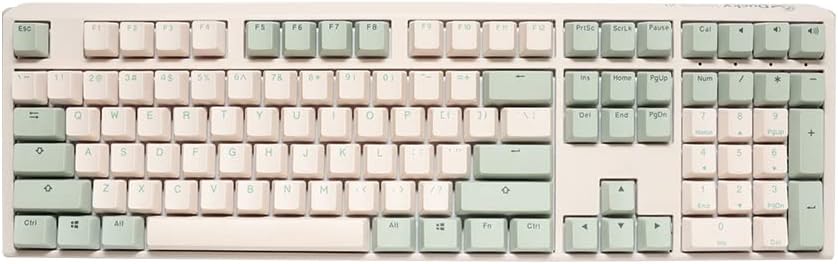
Ducky
Ducky One 3 Matcha Mechanical Gaming Keyboard, Cherry MX Blue
As an Amazon Associate I earn from qualifying purchases.
View Ducky One 3 Matcha Mechanical Gaming Keyboard, Cherry MX Blue on AmazonYou pay the same either way.Specifications
| Switches | Cherry MX Blue, hot-swap sockets |
|---|---|
| Keycaps | PBT doubleshot |
| Lighting | RGB |
| Positioning | Marketed as a gaming keyboard |
Pros & cons
Pros
- PBT doubleshot keycaps resist shine and hold their look through years of typing
- Hot-swap sockets let you change switches later without soldering
- Genuine Cherry MX Blue switches deliver a crisp, clicky feel
Cons
- Marketed as a gaming keyboard, so its RGB lighting may be more than some office users want
- Cherry MX Blue switches are clicky and loud, which carries in a shared room or on calls
Skip it if
Skip it if you want an understated, office-first look — it is styled and marketed as a gaming keyboard with prominent RGB lighting.
How we assessed it
We synthesized this
The Ducky One 3 Matcha is built to outlast a lot of keyboards. Its PBT doubleshot keycaps resist shine, so they hold up through years of daily typing instead of going glossy, and hot-swap sockets let you change switches later without soldering — a rare bit of future-proofing. Genuine Cherry MX Blue switches give it the crisp, clicky feel they're known for. It's made for a typist who wants a durable board they can tinker with over time.
Two honest trade-offs. It's styled and marketed as a gaming keyboard, so the prominent RGB may be more than an office-first setup wants. And those Cherry MX Blue switches are clicky and loud, which carries in a shared room or on calls. Our read is a synthesis of the documented keycaps, hot-swap sockets, and switches and the Ducky One line's build reputation, not a hands-on typing test — see how we test.