Our verdict

For typing all day, the Keychron K8 V2 wins on feel — hot-swap switches, wireless or wired; Logitech MX for low-profile or the Das Keyboard 4 for a USB hub.

Best for best mechanical keyboard for typing all day

As an Amazon Associate I earn from qualifying purchases.

Why we chose it: Hot-swappable switches let you retune the feel by hand, no soldering — and it runs both wireless over Bluetooth and reliably wired over USB-C. Read the full reasoning →

Keychron K8 V2 Wireless RGB Mechanical Keyboard, Hot-Swappable Super Red Switches

Keychron K8 V2 Wireless RGB Mechanical Keyboard, Hot-Swappable Super Red Switches

View Keychron K8 V2 Wireless RGB Mechanical Keyboard, Hot-Swappable Super Red Switches on AmazonYou pay the same either way.
We synthesized thisHow we pickedUpdated Affiliate disclosureIndependent recommendations — never pay-to-play.

Buy this if

  • You prioritize switch feel
  • You prioritize switch changeability
  • You prioritize everyday extras
  • You prioritize intended use

Skip it if

  • Skip a tenkeyless board like the K8 V2 if you punch numbers all day — a full-size layout with a number pad serves spreadsheet work better. And skip tall mechanical switches altogether if a near-silent, low-profile feel matters more to you than deep key travel.

Our top pick

Top pick
Keychron K8 V2 Wireless RGB Mechanical Keyboard, Hot-Swappable Super Red Switches

Keychron K8 V2 Wireless RGB Mechanical Keyboard, Hot-Swappable Super Red Switches

  • SwitchesSuper Red linear, hot-swappable
  • ConnectivityBluetooth and USB-C wired
  • LayoutTenkeyless (no number pad)
  • LightingRGB backlight
  • CompatibilityMac, Windows, and Linux

Pros

  • Hot-swappable switches let you change the typing feel later, no soldering needed
  • Dual Bluetooth and USB-C cover wireless freedom and reliable wired use
  • Works across Mac, Windows, and Linux, so it moves with you between machines

Cons

  • The tenkeyless layout drops the number pad, which spreadsheet-heavy users will miss
  • Even linear switches run audibly louder than a membrane keyboard, which a quiet shared space may notice

Alternatives

Best for a professional office desk

Logitech MX Mechanical Wireless Illuminated Keyboard Tactile - Graphite

Logitech MX Mechanical Wireless Illuminated Keyboard Tactile - Graphite

  • SwitchesLow-profile tactile
  • BacklightSmart auto-adjusting
  • ConnectivityMulti-device Bluetooth
  • CustomizationNot hot-swappable

Pros

  • Low-profile tactile switches give a satisfying, quieter keystroke that suits a shared or open office
  • The smart backlight adjusts to the room's light, so the keys stay readable without wasting power
  • Multi-device Bluetooth pairs with a laptop and desktop at once, so you can switch between them without re-pairing

Cons

  • The switches are not hot-swappable, so the typing feel is fixed and cannot be changed later
  • As a wireless, backlit board it needs occasional recharging, unlike an always-on wired keyboard

Best for a built-in USB hub

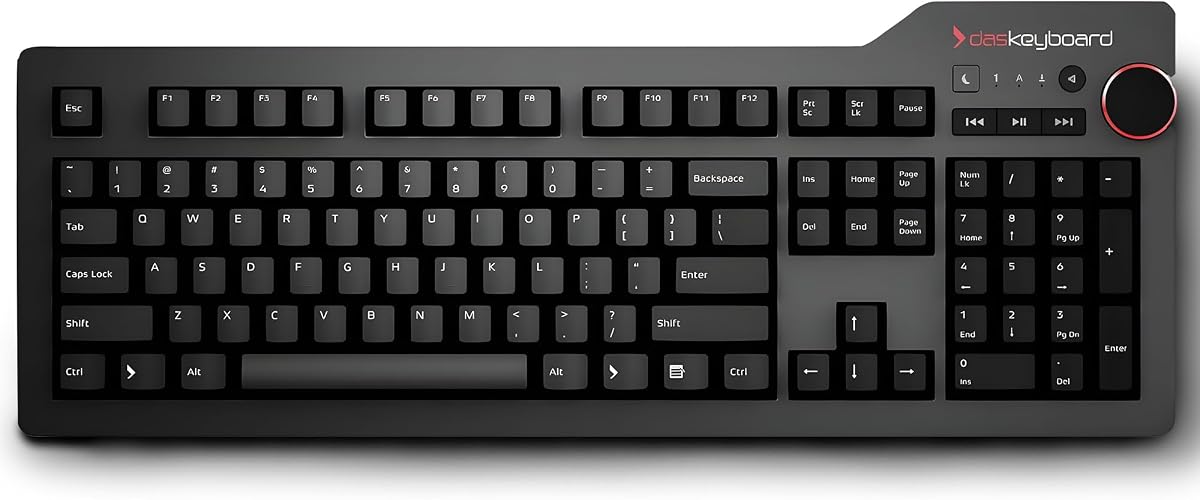
Das Keyboard 4 Professional Wired Mechanical Keyboard, Cherry MX Blue Mechanical Switches

Das Keyboard 4 Professional Wired Mechanical Keyboard, Cherry MX Blue Mechanical Switches

  • SwitchesGenuine Cherry MX Blue
  • ConnectivityWired USB
  • Extras2-port USB 3.0 hub, volume knob
  • LayoutFull-size

Pros

  • Built-in 2-port USB 3.0 hub frees up ports on a crowded desk
  • Dedicated volume knob gives quick, physical control without a key combo
  • Genuine Cherry MX Blue switches are a known, well-regarded quantity

Cons

  • Wired only, so there is no wireless option
  • Full-size layout takes more desk space than a tenkeyless board

Best for long-term keycap durability

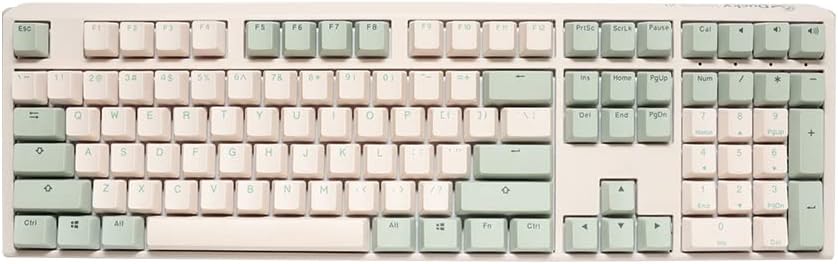
Ducky One 3 Matcha Mechanical Gaming Keyboard, Cherry MX Blue

Ducky One 3 Matcha Mechanical Gaming Keyboard, Cherry MX Blue

  • SwitchesCherry MX Blue, hot-swap sockets
  • KeycapsPBT doubleshot
  • LightingRGB
  • PositioningMarketed as a gaming keyboard

Pros

  • PBT doubleshot keycaps resist shine and hold their look through years of typing
  • Hot-swap sockets let you change switches later without soldering
  • Genuine Cherry MX Blue switches deliver a crisp, clicky feel

Cons

  • Marketed as a gaming keyboard, so its RGB lighting may be more than some office users want
  • Cherry MX Blue switches are clicky and loud, which carries in a shared room or on calls

How the picks compare

The picks compared for best mechanical keyboard for typing all day
Attribute
Keychron K8 V2 Wireless RGB Mechanical Keyboard, Hot-Swappable Super Red SwitchesBest for best mechanical keyboard for typing all day
Logitech MX Mechanical Wireless Illuminated Keyboard Tactile - Graphite
Das Keyboard 4 Professional Wired Mechanical Keyboard, Cherry MX Blue Mechanical Switches
Ducky One 3 Matcha Mechanical Gaming Keyboard, Cherry MX Blue
Switch feelKeychron K8 V2 Wireless RGB Mechanical Keyboard, Hot-Swappable Super Red SwitchesSuper Red linear switchesLogitech MX Mechanical Wireless Illuminated Keyboard Tactile - GraphiteLow-profile tactile switchesDas Keyboard 4 Professional Wired Mechanical Keyboard, Cherry MX Blue Mechanical SwitchesGenuine Cherry MX BlueDucky One 3 Matcha Mechanical Gaming Keyboard, Cherry MX BlueGenuine Cherry MX Blue
Switch changeabilityKeychron K8 V2 Wireless RGB Mechanical Keyboard, Hot-Swappable Super Red SwitchesHot-swappable, no solderingLogitech MX Mechanical Wireless Illuminated Keyboard Tactile - GraphiteNot hot-swappableDas Keyboard 4 Professional Wired Mechanical Keyboard, Cherry MX Blue Mechanical SwitchesProven Cherry MX feelDucky One 3 Matcha Mechanical Gaming Keyboard, Cherry MX BlueHot-swap sockets
Everyday extrasKeychron K8 V2 Wireless RGB Mechanical Keyboard, Hot-Swappable Super Red SwitchesRGB backlight, wireless multi-OSLogitech MX Mechanical Wireless Illuminated Keyboard Tactile - GraphiteAuto-adjusting backlightDas Keyboard 4 Professional Wired Mechanical Keyboard, Cherry MX Blue Mechanical Switches2-port USB 3.0 hub, volume knobDucky One 3 Matcha Mechanical Gaming Keyboard, Cherry MX BluePBT doubleshot keycaps resist shine
Intended useKeychron K8 V2 Wireless RGB Mechanical Keyboard, Hot-Swappable Super Red SwitchesWireless typing across Mac, Windows, LinuxLogitech MX Mechanical Wireless Illuminated Keyboard Tactile - GraphiteA professional, low-profile office deskDas Keyboard 4 Professional Wired Mechanical Keyboard, Cherry MX Blue Mechanical SwitchesA desk short on USB portsDucky One 3 Matcha Mechanical Gaming Keyboard, Cherry MX BlueYears of shine-free daily typing

What to look for

Switch feel

The switch under each key sets the sound, resistance, and comfort of every keystroke across a full day of typing.

Switch changeability

Hot-swap sockets let you change the typing feel later without soldering, so the board evolves with your taste rather than dating.

Everyday extras

Backlighting, media controls, and keycap quality shape how a board feels and holds up on a real desk.

Intended use

Matching a board to how and where you type matters more than any single spec on the sheet.

How we chose

We synthesized this

Type on a keyboard all day and you notice one thing above all: feel. The switch under each key sets the sound and resistance of every keystroke, so the right board is the one that suits your hands and your desk — not the one with the longest feature list.

We weighed each board on four things that shape daily use: the switch feel, whether you can change that feel later, the everyday extras like backlighting and desk conveniences, and what each board is really built for. The Keychron K8 V2 wins for all-day typing because it pairs a comfortable hot-swappable switch with both wireless and wired connection, so it fits almost any setup.

The alternatives suit different desks. The Logitech MX Mechanical fits a quiet, professional office with its low-profile switches. The Das Keyboard 4 adds a built-in USB hub and volume knob for a crowded desk. And the Ducky One 3 is built for the long haul, with PBT keycaps that resist shine over years of use.

Every call here is a synthesis of documented construction and each board's established reputation, not a timed lab test — you can read exactly what that means on our how-we-test page. Whichever you choose, the switch feel is what you'll notice every day, so let that lead.

Frequently asked questions

Are mechanical keyboards better for typing all day?

Often, yes. Many people find the defined switch feel and sturdier build more comfortable over long sessions than a flat membrane keyboard — but the right switch matters more than the label. Linear switches glide, tactile ones give a bump, clicky ones add sound. Match the feel to your hands.

What does hot-swappable mean, and do I need it?

Hot-swappable boards let you pull one switch out and drop another in by hand, no soldering. It's not essential, but it lets you change the typing feel later — or replace a failed switch — without buying a whole new board.

Tenkeyless or full-size?

Tenkeyless boards drop the number pad to free up desk space and keep your mouse closer, which many typists prefer. Full-size boards keep the pad, which helps if you enter numbers often. Choose by how much you rely on the number pad.